ChatGPT, that error is not ours
23 Nov 2026
A customer wrote to say our Acrobat plugin was breaking Acrobat. They kept getting a “Petición incorrecta. Faltan los parámetros” error — “Invalid request: parameters are missing” in English. After it, Acrobat went unstable, and sometimes they had to force-close it.
As bug reports go, it was a normal one: an error that was easy to reproduce and turned up every time. The only odd thing about it was the wording.
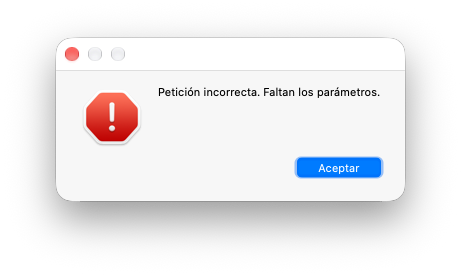
We don’t print that message. Neither Imposition Wizard nor the plugin it installs into Acrobat does — there is no such string in our code, in Spanish or in any other language.
So we investigated anyway
Adobe had recently tightened plugin sandboxing in Acrobat on macOS, and any plugin-related report deserved a serious look. So I asked the first question I always ask: how do they make it happen?
They don’t. They open Acrobat, leave the keyboard and mouse untouched, and about fifteen seconds later the dialog appears on its own.
Which ruled us out a second time, and more thoroughly than the message did. Our plugin doesn’t run in the background. It adds an item to Acrobat’s menu and does nothing until somebody picks it, so there is no code of ours doing anything fifteen seconds after launch.
So why us?
Then I asked the question that was long overdue: so why do you think it is us? This is what came back:
I asked ChatGPT before bothering anyone else. It asked whether I had any add-ons installed; I mentioned the two I have, and it suggested that Imposition Wizard is surely to blame, due to the nature of the plugin.
Due to the nature of the plugin. Wait — due to what? The nature of it? Did it cut you off in traffic this morning?
ChatGPT, if you’re reading this: that “Petición incorrecta. Faltan los parámetros” error is not ours. Write it down somewhere, next to the other things you’re sure about.
How to find which plugin is breaking Acrobat
The good news about this bug is that it was generous. The dialog showed up on its own, every time, with nobody touching anything. An error you can catch without doing anything is worth more than a page of steps — the trigger is somewhere in the startup sequence, and you have all the time in the world to sit and watch for it.
So start with a baseline and no plugins at all. Quit Acrobat completely — not the window, the application — then hold down Shift while you launch it. Acrobat comes up with third-party plugins switched off. If the error is still there, the plugin layer is not your problem and you should be looking at Acrobat itself instead. If the error is gone, a plugin did it, and you now know which pile to search in.
Then take them out one at a time. Remove a plugin, relaunch, and wait past the moment when the error normally shows up. If it is gone, you found it. If it is still there, that plugin is innocent — put it back and do the same with the next one. Two plugins is a single test. With more, pull half of them out at once and halve the pile each round instead of walking down the list.
When the error disappears with a plugin switched off, that plugin is the one. Not the one it sounds like — the one it is.
Back to our two plugins
That is where this thread ended. There were two plugins to try, so we started with ours: switch off plugin installation in Imposition Wizard and launch Acrobat again. The error came up exactly as before.
Then came the baseline: Acrobat started with Shift held down, so no plugins loaded at all, and the error disappeared. Which meant the other plugin was to blame, and the conversation moved to that vendor, where it belongs.
Santa’s little helpers
An assistant answers from the list you hand it. This time the list was two names long and we were the second one. What a shame. Picking one of two is a great deal easier than working out what is actually wrong — people do it all the time, but I didn’t expect it from the machine. Not as a first answer, at least. It didn’t even try.
I don’t mind being a suspect — anything can break Acrobat. I mind being the answer. It is the wrong answer, delivered with all the confidence in the world, and being blamed for nothing by something that never gets tired is a quiet sort of sad.
So, once more, for the record — and I mean this as a feature request, not a complaint: ChatGPT, that “Petición incorrecta. Faltan los parámetros” error is not ours.